Page Title: Delete Your 99LAND Account
Intro:
At 99LAND, we respect your privacy and give you full control of your account. If you decide to stop using our services, you can permanently delete your account at any time.
How to Delete Your Account:
- Log in to your 99LAND account (on the app or website).
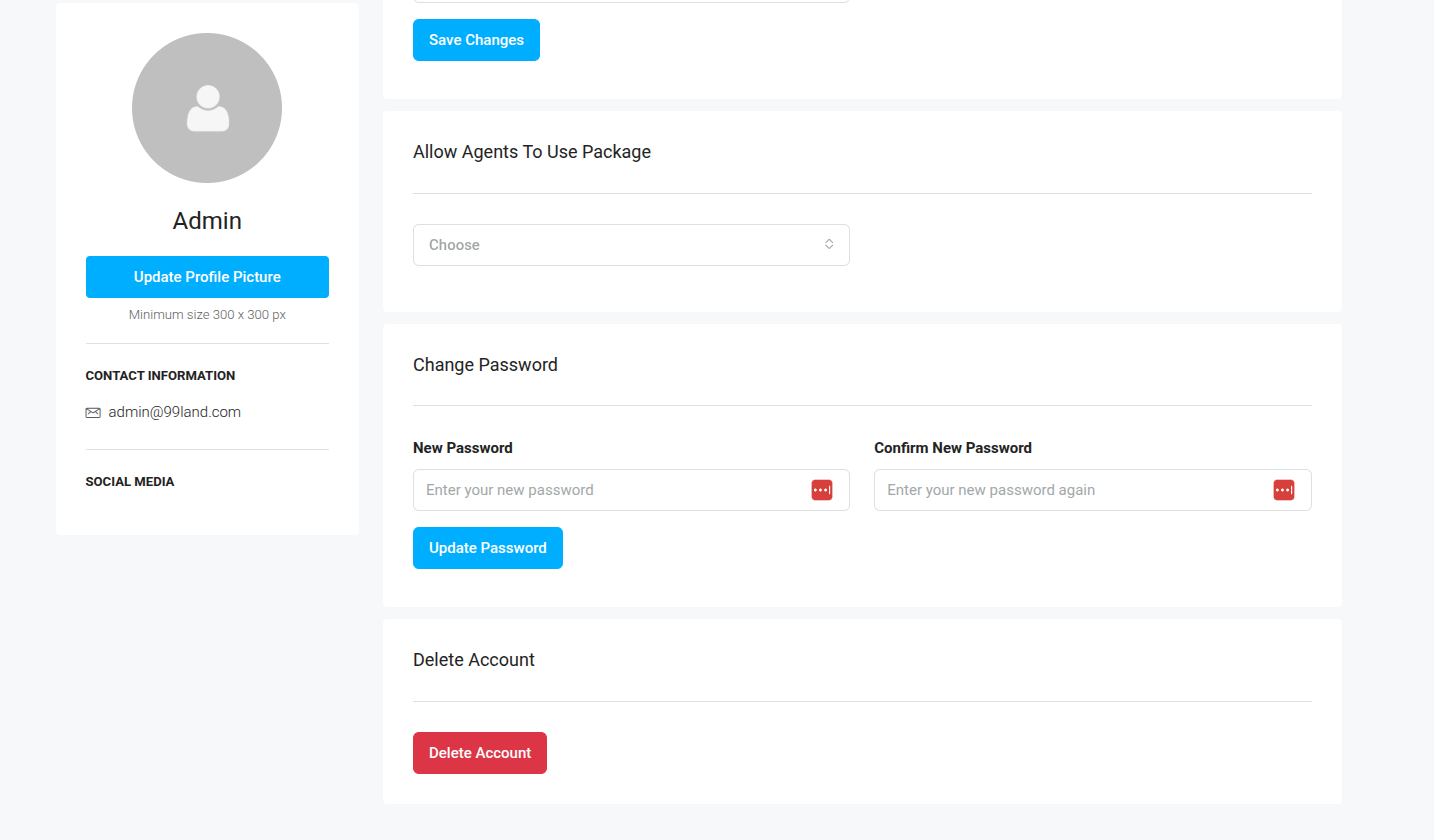
- Go to Dashboard —> Profile / My Account
- Select Delete Account.
- Confirm your choice. Once confirmed, your account and associated data will be permanently deleted.
- Below Mentioned Screenshot.
Alternative Method:
- If you are unable to access your account, you can request deletion by contacting us at admin@99land.com with your registered email ID.
Important Notes:
- Account deletion is permanent. Once deleted, your data cannot be recovered.
- Any active listings, saved properties, and preferences will also be removed.
- If you just want to take a break, you can log out without deleting your account.
Need Help?
If you face any issues, please contact our support team at admin@99land.com.